- Email:info@psycare.it
- WhatsApp: +39 375 703 9065
Try these steps to resolve connection issues.
Check your browsers
First, close other browsers and/or pages: browsers often exchange data, even without your knowledge, and this can affect your bandwidth available for video calls.
Check your connection quality
- Check the quality of your connection directly on PsyCare, you can do it for yourself and your patient:
- Access the Virtual Room by starting an online session and clicking on the network icon

- Access the Virtual Room by starting an online session and clicking on the network icon
-
- Evaluate your connection quality now: click on

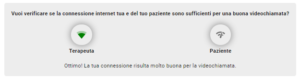
- Evaluate your connection quality now: click on
-
- Also check the quality of your patient’s connection: click on his
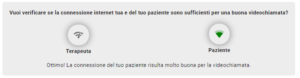
- Also check the quality of your patient’s connection: click on his
Check your connections
- Make sure Wi-Fi or data reception hasn’t been inadvertently turned off.
- If Wi-Fi is offline: Restart your modem, router, and device, then reconnect to Wi-Fi.
- Check that the cables are connected correctly, that the router is turned on, and that there are no abnormalities (red lights or other). Network cables may be disconnected or loose, both those from the computer and those from the router.
- Make sure the physical Wi-Fi switch on your laptop is turned on.
- Make sure Airplane Mode is turned off.
Restart your wireless router and modem
This is the simplest method, but it can sometimes be very effective. The modem is the device that communicates with the Internet service provider, while the router shares the connection among all the computers and other network devices in the home.

PsyCare for the Environment