
Access to the Virtual Room Waiting Room
Log in to the platform with your registration credentials to start an online session.
-
Select
 that you see on your Home Page and access your VIRTUAL WAITING ROOM directly before entering the Virtual Room: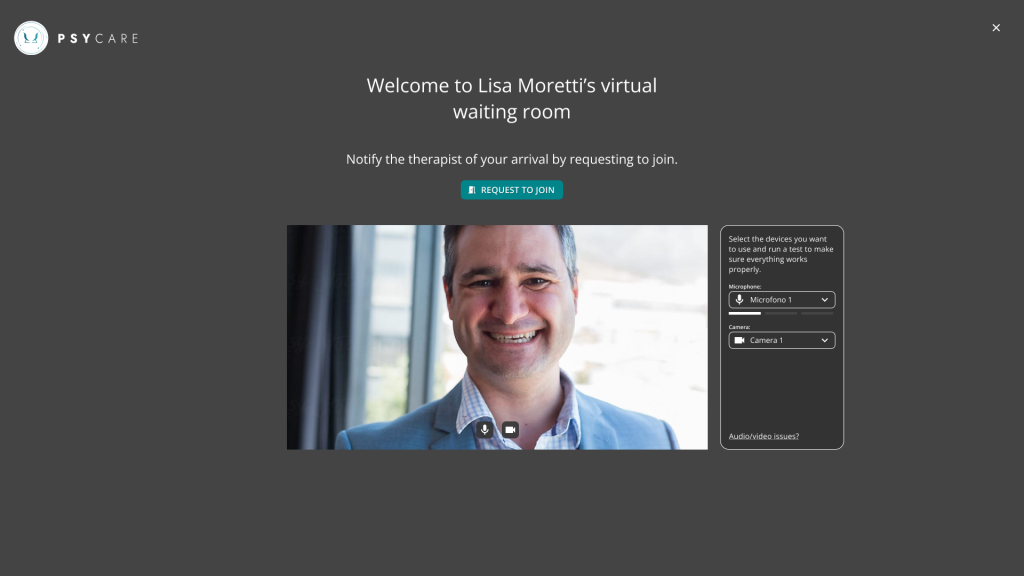
Virtual Waiting Room Options
In your VIRTUAL WAITING ROOM you have these options:
-
- You can click on ‘REQUEST TO JOIN’ to inform the therapist of your arrival and wait.
- You can select the microphone you want to use by clicking on the respective one.
 and choose from the alternatives available on your device;
 - you can Select the camera you want to use by clicking on the respective button.and choose from the alternatives available on your device;
- If you had not already clicked on REQUEST TO JOIN, you can click ‘CLOSE’ to permanently close the VIRTUAL WAITING ROOM with the therapist, without starting the online session.
The online session will begin as soon as the therapist accesses your virtual waiting room from their page.
