
From the side menu Click on PAYMENTS and access the section. You’ll see two tabs:
- PAYMENTS TO BE MADE
- PAYMENT HISTORY.
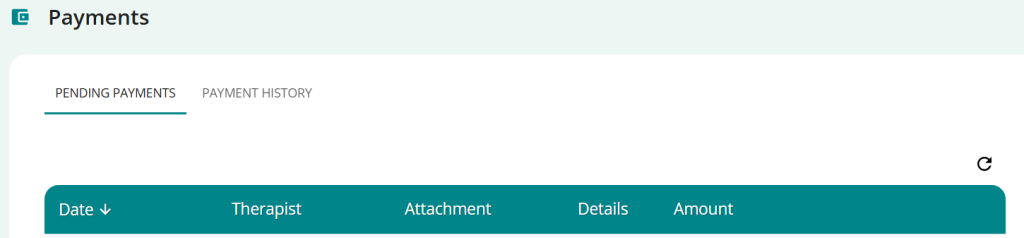
PsyCare allows you to carry out directly from the platform ((via credit card or SEPA bank transfer) Pay online for your therapist sessions securely and easily.
When your therapist submits a payment request on your behalf for one or more sessions (whether already completed or to be completed), your payment page in PsyCare updates and you see the list of payment requests you still need to make.
On the Payments to be made page you can:
- click on
 to download the invoice(s) you see in the attachments column
 - click on Summary to view the payment summary (for online sessions carried out on the platform)
- click on
 proceed to online payment.
You can pay for your session directly from Psycare:
- click on and proceed to online payment
- by credit card:
- click on
 to select the option and fill in the fields as required
- Click PAY €__,__ to confirm and complete the payment.
- click on
- via SEPA bank transfer:
- click on
 to select the option and fill in the fields as required
- Click PAY €__,__ to confirm and complete the payment.
- click on
In the payment history section, you will see the status of the payment you just made and will receive a confirmation email.
When the therapist submits a payment request, you will also receive a request notification via email:
You can pay directly from the email you receive:
- click on and proceed to payment online.
- by credit card:
- click on to select the option and fill in the fields as required
- Click PAY €__,__ to confirm and complete the payment.
- click on
- via SEPA bank transfer:
- click on to select the option and fill in the fields as required
- Click PAY €__,__ to confirm and complete the payment.
- click on
In the payment history section, you will see the status of the payment you just made and will receive a confirmation email.
When the therapist submits a payment request, you will also receive a request notification via SMS.
You can pay directly from the SMS you receive:
- Click on the link you see in the message and proceed to online payment.
- by credit card:
- click on to select the option and fill in the fields as required
- Click PAY €__,__ to confirm and complete the payment.
- click on
- via SEPA bank transfer:
- click on to select the option and fill in the fields as required
- Click PAY €__,__ to confirm and complete the payment.
- click on
In the payment history section, you will see the status of the payment you just made and will receive a confirmation email.
From the payments page, access the section by clicking on PAYMENT HISTORY at the top left.
You can view a list of all the payments you’ve already made through PsyCare, sorted by date.
For each payment you see:
- Date: the nanny where you made the payment
- Therapist: your therapist’s name
- Attached: if present, you can upload the invoice attached by the therapist
- Details: for the sessions already completed you can view the summary
- Amount: the total amount paid
- Status: the status of the payment (paid, pending, or failed)
