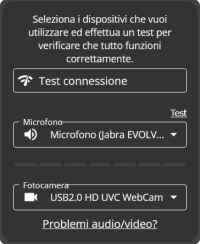
Below are the most common problems that other users, like you, have encountered..
You can always send an email to help@psycare.it to contact support and help you resolve the problem, or ask via chat.
To participate in a video session, you must allow PsyCare to access your camera and microphone. Your patient may have accidentally clicked Block, preventing you from viewing.. Click here to see how to allow access to your camera and microphone.
PsyCare cannot use the camera or microphone because they are being used by other software.
If it only has a camera or microphone, make sure it closes any other software that is using them (e.g.. Skype, Whatsapp Web, Microsoft Teams, FaceTime…) or advise him to turn off and on his PC or smartphone again.
If you have multiple cameras or microphones, you can choose which one to use:
1. Inside the waiting room, select the audio or video input you want from the drop-down menus and refresh the page.
2. If you are already in the virtual room, open the side column and, in the tab
Settings, select the devices you want to use from the drop-down menus. Finally, refresh the page.
Inside the video session, the camera icon in the bottom bar must not be crossed out but must look like the image you see below.
Some cameras have a mute button or cover. If yours does, make sure it’s not covered and that the camera is active.
Make sure your browser is updated to the latest version. Click here to see how.
If they can’t use PsyCare, ask them to try a different browser. In particular, if they use Safari, you can recommend using Chrome.
To conduct online sessions, you need a camera. If your PC doesn’t have one, make sure the cable is properly plugged in and the camera is turned on.
Sometimes cookies can prevent access to certain features.. Click here to see how to delete them.
Ask them to make sure psycare.it is not among the sites blocked by their antivirus, firewall, or parental controls.
Ask them to close and reopen the browser and log back into PsyCare. Alternatively, ask them to restart the device.
WhatsApp: +39 375 703 9065
General Inquiries: info@psycare.it
Support: help@psycare.it

PsyCare for the Environment
We offset CO₂ emissions by planting a tree for every activated subscription: learn more.